 Etiquetario
School name labels, ready to print.
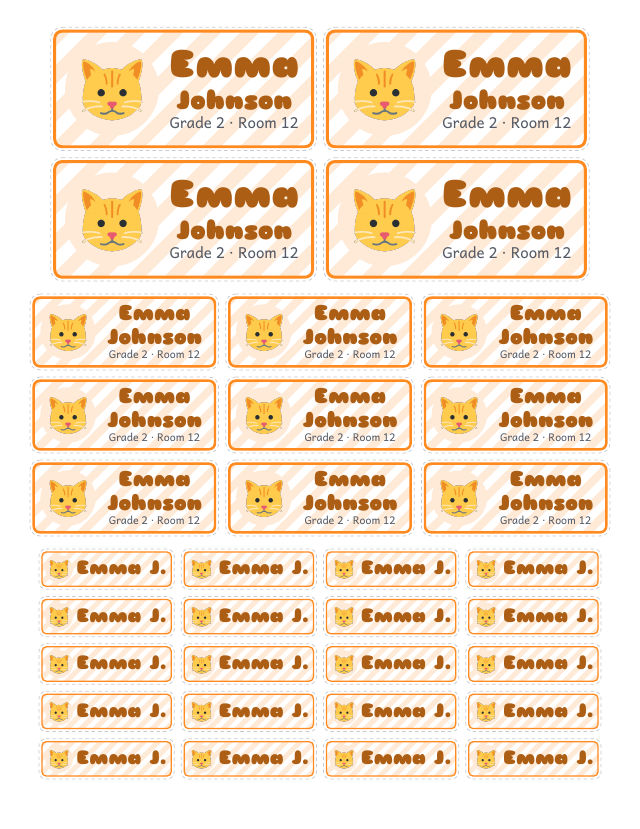
For notebooks, books, pencils, bottles and lunchboxes. With each child’s name, grade and favorite picture.
Type the name, pick a design and download the PDF. Works on your phone, no account, and your kids’ details stay on your phone.
How it works
- ✏️
1. Type the name
First and last name and, if you like, the grade or class. Add all your kids: each gets their own label.
- 🎨
2. Pick a design
A picture (dinosaur, unicorn, rocket, ball…) or their photo, eight designs, ten colors and four letter styles.
- 🖨️
3. Print the PDF
On Letter or A4 label sheets, full-sheet sticker paper or plain paper. At home or at a copy shop.
A label for everything
- 📒
Notebooks and books
Large labels with first name, last name and grade for the cover of a notebook or book.
- 🧃
Bottles and lunchboxes
Medium labels you can read from across the room. With vinyl sticker paper or clear tape they handle water.
- ✏️
Pencils and crayons
Slim labels to wrap around pencils, crayons and markers.
- 📄
Common label sheets
Letter 30, 10 and 80 per sheet; A4 21, 14 and 65 per sheet (Avery sizes), plus a mixed cut-out sheet.
- 👧👦
The whole family
Up to 6 kids, each with their own design. Download labels for one or for all of them.
- 🔒
Private
Names and photos stay on your phone. The PDF is made right there; nothing is uploaded.
Ready for back to school
- Label everything before the first day of school.
- Works for school, preschool and daycare.
- If a pencil or a bottle gets lost, it finds its way home.
Price
Making the labels and downloading the preview (with a “SAMPLE” mark) is free. Labels without the watermark will be a one-time payment of US$3.99 for the whole family (up to 6 kids), not a subscription.
No watermark: coming soon
Make my labelsQuestions
What paper should I print the labels on?
The easiest is full-sheet sticker paper: use the “Cut-out sheet”. If you have pre-cut label sheets, pick the format with the same size (for example 30 per sheet, 2⅝ × 1 in).
Are they waterproof for bottles and lunchboxes?
Regular sticker paper isn’t. For bottles and lunchboxes use printable vinyl, or cover the label with wide clear tape.
How do I make it line up with my label sheet?
Print at “Actual size” or “100%”, never “Fit to page”. Test on plain paper first and hold it over the label sheet against the light.
Can I make labels for several kids?
Yes, up to 6 kids per family, each with their own name, picture and colors.
Do I need an account?
No. It opens in your phone’s or computer’s browser and that’s it.
Can I use my child’s photo?
Yes. The photo is shrunk and stays on your phone; it is never uploaded to a server.